Here you will find Interactive courses and modules.
1. Cloud Coding Microlearning
This interactive microlearning is a 10-minute knowledge share with a 4-question assessment for new developers. It introduces browser-based IDE Cloud Coding.

Select to Launch
(Original Publish Date: 12/1/2025)
This microlearning is the result of an effort to replicate the development process we shared in the description with the course below – in that we did not utilize our standard e-learning authoring apps Articulate Storyline 360 or Rise 360 to build the course. Instead, we simply leveraged the power of AI with Google Gemini’s Canvas tool. Different from the microlearning below, this particular course has a bit more content. We also wanted to find if the Canvas tool could generate photorealistic images and embed them into its finished HTML code. It could not. It could only create basic icons and simple graphic representations.
2. Telehealth Counselor Assessment
This interactive microlearning is a 5-minute knowledge burst assessment for telehealth counselors. It emphasizes protocols in a crisis management scenario.

Select to Launch
(Original Publish Date: 11/18/2025)
This microlearning assessment is a result of a “trial” e-learning course development process using only GenAI tools for its production. (In previous learning solutions development processes, we utilized e-learning authoring apps, like Articulate Storyline 360 and Rise 360, to build our courses and learning solutions). Not this time.
More…
STEPS:
(1) Leveraging the power of Google Gemini, we entered a text prompt and Gemini went into action – automatically leveraging its Canvas tool and initiating the execution of developing the interactive learning module.
It happened in less than 20 seconds. It worked in the Canvas tool’s interface. However, when we observed the created code, we noticed it wasn’t standard HTML code. It wasn’t going to function in a standard web browser, which is what we ultimately wanted. For verification, we tested this and, as expected, it did not function in a web browser.
(2) In the Canvas tool’s interface, there was a chat interface allowing for requests, changes and/or refinement. In that chat interface, we expressed that the produced code was not workable in a standard web browser, and the learning module needed to be capable of working in a standard web browser with proper HTML structure.
The Canvas tool went back into action and re-created the code into proper HTML syntax and structure. The result, however, did not work even in the Canvas tool’s interface. It did have an option to “View the Console” where you could see the erroneous code. It also had a “Fix the Errors” option.
(3) After viewing the erroneous code, which wasn’t helpful, we selected the option to “Fix the Errors”. Again, the Gemini Canvas tool executed the error corrections and produced another code delivery. And this time it worked in the Canvas tool’s interface.
(4) We copied the final code and pasted it into a text editor, Notepad++, and saved it locally onto the computer hard drive as an .html file (index.html). We then tested that local file in two web browsers by opening it first in MS-Edge and then Google Chrome. It worked in both.
(5) We then uploaded it to this WordPress platform. The result is the interactive learning module above.
In Summary, this was a learning experience for sure, and even with the minor missteps and error-fixes, the process only took about 45 minutes. Moving forward, this process will offer our teams a fast and efficient learning solutions development methodology to create scored assessments and other interactive learning apps very quickly.
3. Triage Nurse Microlearning
This interactive microlearning is a 3-part, 5-minute knowledge burst for triage nurses. It emphasizes critical specimen handling requirements.
Select to Launch
(Original Publish Date: 11/11/2025)
This microlearning consists of a Pre-Assessment, a multi-step Scenario-Based Learning Activity, and a scored Final Assessment that is built for scalability.
Harnessing AI: As with all of our recent courses and module builds, we continue to combine multiple GenAI tools in unique hybrid workflows for improved quality and time-savings.
By blending multiple AI-powered and e-learning authoring apps in our process, we reduce total development time by approximately 40-50% for most projects. For this project, specifically, what normally may have required around 30-35 hours, we completed and published this microlearning in 18-20 hours.
The reduction in time was not from AI “building the course,” but from its assistance in eliminating the blank-page-paralysis and research associated with content creation, storyboarding, and asset sourcing, allowing us to focus on the high-value “architect” work of building the logic and interactions.
Primary AI Tools: Google Gemini, Adobe Firefly, and Articulate Storyline 360 with AI Assistant
Primary Authoring Tool: Articulate Storyline 360 with AI Assistant
Key Interactive Features used:
- Scenario-based Interaction – used for the core learning activity.
- Conditional Layers & Lightbox – used for learner feedback for the pre-assessment, the scenario-based learning activity, and the final assessment.
- Number Variables – used for the Final Assessment scoring calculation.
Secondary Design Tools: Adobe Illustrator, Techsmith Snagit
4. Math Challenge Assessment
This interactive math challenge is a dynamic ‘Fractions and Percentages’ Drag-and-Drop Activity. It is for early learners and has five exercises each worth 10 points.
Select to Launch
This interactive math challenge is intended for learners tackling the challenging subject of Fractions and Percentages and is integrated with an Environmental Wellness theme.
More…
Each exercise offers hints should the learner drag-and-drop the incorrect number of items per the instructions. It allows as many repeat attempts as needed to get it right. This can be adjusted, of course, to limit the number of attempts.
Although on the surface this intuitive challenge appears common, the “under-the-hood” development was complex. It combines Articulate Storyline 360’s ‘Drag-and-Drop’ interaction, and incorporates advanced ‘Number Variables’ functionality for custom triggers, dynamic layers’ feedback with hints, learning exercise calculations and assessment scoring.
Objective: This was built to help early learners or those who are math-challenged find confidence in the Fractions/Percentages subject area. The interactive module was developed with flexibility in mind, allowing for rapid scalability, more exercises can be added, and certainly branding/customization can occur depending on an organization’s or a learner’s needs.
Primary Authoring Tool: Articulate Storyline 360
Key Interactive Features used:
- Drag-and-Drop Interaction – used for the core engaging fractions and percentages exercises
- Conditional Layers – used for learner feedback (Correct, Not Correct, Not Correct with Hint) and Navigation
- Number Variables – used for dynamic customization across drag-and-drop variations accommodations, dynamic layers feedback display, and math exercise scoring calculation
Secondary Design Tools: Adobe Illustrator, Techsmith Snagit
5. Articulate Storyline 360: Advanced Variables Training
- A training guide for instructors delivering live training on Storyline’s advanced variables
- An interactive course template with pre-built interactions, variables and assessments
Select to Launch
This interactive engaging course serves two purposes. First, and foremost, it is to be used by instructors delivering live training on Articulate Storyline 360’s Advanced Variables. Secondly, it is a clean template ready for customization with optimal scalability. With a rebranding and content updates, this dynamic course is ready to go.
More…
This interactive course utilizes all of Storyline’s variables: True-False, Number, and Text. During live training, an instructor can present this course in concert with the Storyline 360 application’s original course file open. The instructor can review all the variables, the concepts, the variables’ dynamic triggers, objects’ state changes and custom layer presentations.
Objective: Teaching students, colleagues, fellow instructional designers and e-learning developers is my passion. It truly is one of the most joyful experiences one can have. This course was initially created to be used in live training delivery. However, having built it out, I found it serves very nicely as a pre-built ready-to-go course template as well.
Primary Authoring Tool: Articulate Storyline 360
Secondary Design Tools: Adobe Illustrator
6. Interactive Module: Yoga Pose Video Menu
This 5-tab interaction consists of 5 distinct yoga pose modules, each with yoga pose instructions, benefits, and a demonstration video.
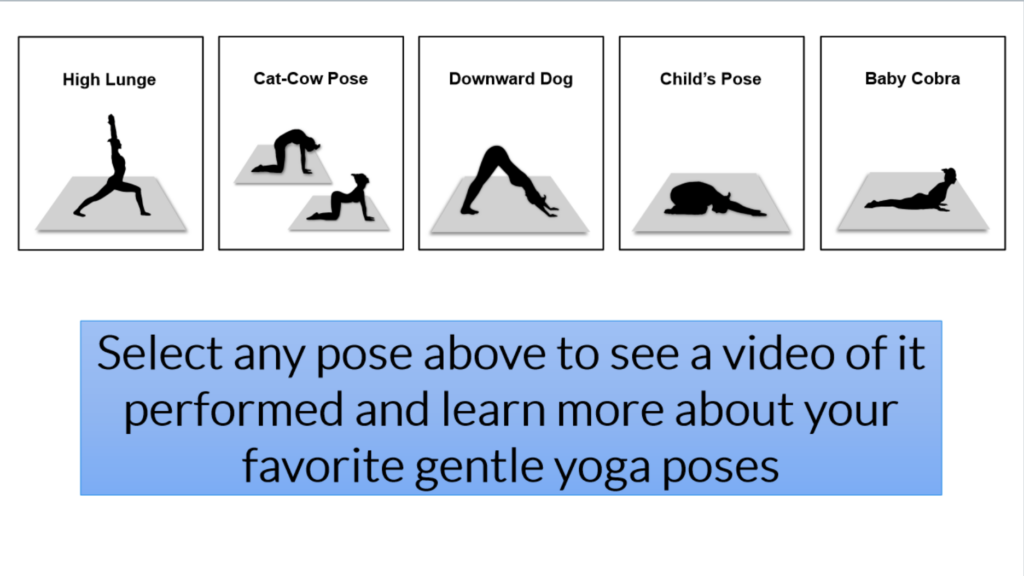
Select to Launch
The videos in each of the 5 modules are clips of the yoga instructor performing each of the 5 individual yoga poses. This interactive module is in a draft form only and is not the live published version.
It is displayed here for demo purposes only.
More…
This module has been designed as a template capable of being reproduced many times over with different yoga poses that should be performed in a sequence. It has 5 tabs each representing a unique yoga pose. When a tab is selected, a new screen is displayed providing instructions, benefits, and a video demonstrating that pose.
Objective: This module and future interactive modules are intended to drive the yoga studio’s web visitors to their YouTube Channel and increase their number of subscribers and views. Each new module built will be loaded to the yoga studio’s website. The desire is to have web visitors “lean in”, want to learn more, and select the YouTube Channel link. Ultimately, the hope is to convert web visitors into YouTube Channel subscribers.
Primary Authoring Tool: Articulate Storyline 360
Secondary Design Tools: Adobe Illustrator & Photoshop, Affinity Designer 2